Your headshot keeps lagging at the worst possible moment. You’ve upgraded your internet plan, closed every background app, and still you’re rubber-banding across the map. The missing piece isn’t your ISP—it’s how your traffic leaves your house. Gaming routers solve this by treating your gaming packets like VIP guests at a crowded venue, ensuring they skip every line and arrive first.
Unlike standard routers that treat Netflix streams and game updates with equal priority, gaming routers use specialized algorithms to identify and fast-track your most time-sensitive data. This guide breaks down exactly how these devices transform chaotic home networks into precision-tuned gaming machines. If you’ve ever wondered how does a gaming router work to deliver that competitive edge, you’re about to discover the technical magic happening behind the scenes.
Why Standard Routers Fail Gamers During Peak Play
Most home routers operate on a first-come, first-served basis, creating digital traffic jams when multiple devices compete for bandwidth. When your roommate starts a 4K Netflix stream during your ranked match, your gaming data gets stuck in the same queue. Gaming routers solve this by implementing intelligent traffic management that recognizes gaming data patterns and gives them priority treatment.
The critical difference lies in how gaming routers process data packets. While standard routers simply forward packets in the order they arrive, gaming routers continuously analyze traffic to identify gaming-related communications. This real-time analysis happens through deep packet inspection that examines destination ports (like 3074 for Xbox Live), data patterns unique to gaming protocols, and timing characteristics of time-sensitive traffic.
How QoS Actually Prioritizes Your Gaming Traffic
Quality of Service (QoS) functions as your network’s intelligent traffic controller, but it’s far more sophisticated than simple bandwidth allocation. Modern gaming routers use adaptive QoS that dynamically adjusts priorities based on:
- Real-time network congestion levels
- Specific game being played (FPS, MMO, battle royale)
- Current network activities (streaming, downloads, video calls)
- Device type (console vs. gaming PC)
When your gaming device sends position updates to the server, the router instantly recognizes these time-sensitive packets and pushes them to the front of the transmission queue. This happens within milliseconds, preventing the lag spikes that ruin competitive matches. The system automatically adjusts when network conditions change—so if someone starts downloading a game update mid-match, your gameplay traffic maintains priority without manual intervention.
MU-MIMO Technology: Ending the Single-File Device Queue
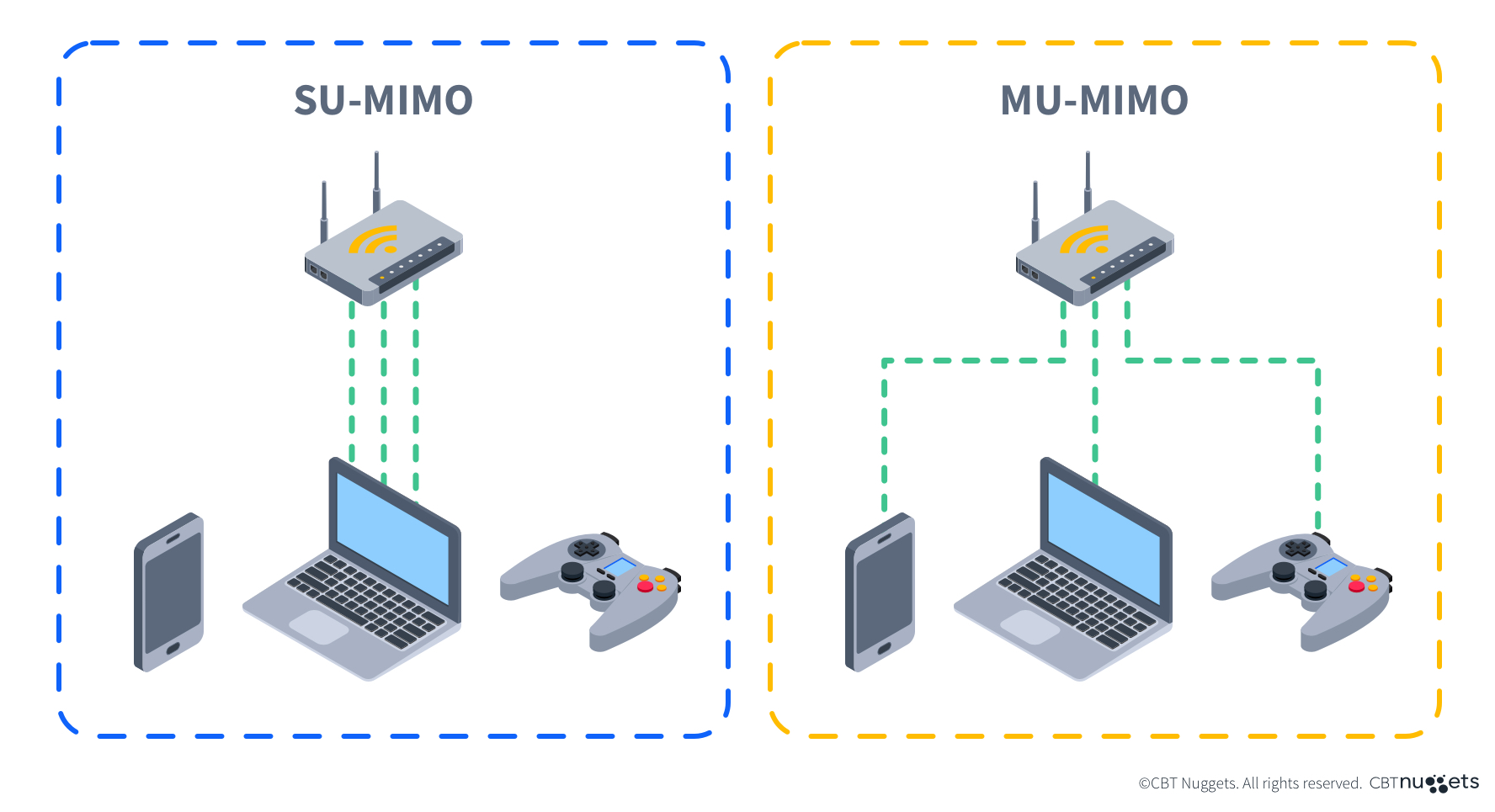
Traditional routers communicate with devices one at a time, creating bottlenecks when multiple household members use the network simultaneously. Gaming routers with MU-MIMO (Multi-User, Multiple-Input, Multiple-Output) technology eliminate this limitation by communicating with multiple devices simultaneously.
Real-world impact for gamers:
– Up to 4 devices connected simultaneously without performance drops
– 75% reduction in device wait times during peak usage
– Consistent frame pacing even with streaming and downloads running
This parallel communication capability means your gaming console doesn’t have to wait while your phone downloads updates or your smart TV buffers a show. The router creates separate data streams for each device, effectively multiplying your WiFi capacity during critical gaming sessions.
Beamforming: Laser-Focused Signal for Your Gaming Devices
Instead of broadcasting WiFi signals equally in all directions like standard routers, gaming routers use beamforming technology to focus signal strength directly toward your gaming devices. This targeted approach:
- Increases effective range by 20-30% in your primary gaming area
- Reduces interference from neighboring networks and household electronics
- Maintains stronger connections as you move through your home
The router continuously tracks your device’s location and adjusts the signal direction to maintain optimal connection quality. When you’re gaming in the living room, the router focuses its energy there rather than wasting signal strength in unused rooms or through exterior walls.
Hardware That Actually Handles Gaming Demands

Processing Power That Prevents Network Bottlenecks
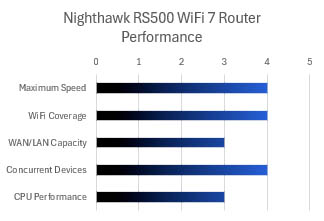
Gaming routers pack significantly more processing power than standard models—typically featuring quad-core 1.8GHz processors compared to the dual-core 800MHz chips in basic routers. This computational headroom enables real-time traffic analysis without introducing processing delays that would negate gaming benefits.
Memory allocation directly impacts gaming performance:
– 512MB RAM: Supports 50+ connected devices without slowdown
– 1GB RAM: Handles complex QoS calculations for 100+ devices
– Dedicated flash storage: Stores gaming profiles and firmware updates
Ethernet Ports Engineered for Competitive Gaming

The physical connectivity on gaming routers prioritizes wired connections for maximum stability:
– 4-8 Gigabit ports: 1000 Mbps full-duplex connections
– Gaming-labeled ports: Often optimized for lowest latency
– Link aggregation: Combines multiple ports for 2Gbps+ speeds
Pro tip: Connect your primary gaming device to the lowest-numbered ethernet port—this typically receives highest priority in the router’s internal switching fabric. For competitive gamers, this wired connection combined with proper router configuration can reduce ping times by 15-30ms compared to standard WiFi.
Security Features That Protect Without Penalizing Performance
DDoS Protection Built Specifically for Gamers
Gaming routers include specialized DDoS protection that monitors for attack patterns common in competitive gaming. When detecting suspicious traffic floods targeting your gaming connection, the system filters malicious packets within milliseconds while maintaining legitimate game data flow.
Unlike standard security measures that might block legitimate gaming traffic, these systems recognize gaming protocols and prioritize keeping your connection stable during attacks. This protection activates automatically when suspicious activity is detected, preventing disconnections during crucial matches without requiring manual intervention.
Gaming-Optimized VPN Implementation
Traditional VPNs often double your ping time, but gaming routers solve this through specialized implementations:
– Automatic server selection: Finds fastest available gaming-optimized servers
– Split tunneling: Routes only gaming traffic through VPN
– Latency-focused protocols: Maintains sub-30ms increases even with encryption
This means you can securely connect to international game servers or protect against swatting attempts without sacrificing competitive performance—a critical advantage for serious gamers.
Setting Up Your Gaming Router for Maximum Benefit
First 5 Minutes: Critical Configuration Steps
After connecting your gaming router to the modem, follow these essential steps:
- Access router interface: Navigate to 192.168.1.1 or 192.168.0.1
- Enable gaming mode: Look for “Gaming Optimization” or “Adaptive QoS”
- Prioritize your devices: Add your console/PC to highest priority tier
- Configure dual-band: Reserve 5GHz band exclusively for gaming devices
- Apply firmware updates: Install latest gaming-specific optimizations
Skipping these steps means your expensive gaming router functions as little more than an overpriced standard router. The initial configuration takes less than five minutes but delivers the most significant performance improvements.
Creating Game-Specific Network Profiles
Advanced gaming routers allow genre-specific profiles that automatically optimize network parameters:
– FPS Mode: Prioritizes UDP traffic, reduces jitter for shooters
– MMO Mode: Balances bandwidth for voice chat and game data
– Streaming Mode: Optimizes for game streaming services
These profiles activate automatically when launching specific games through application recognition, adjusting network parameters without manual intervention. For example, when you launch Fortnite, the router automatically switches to battle royale optimization, then reverts to general settings when you close the game.
Why Gaming Routers Benefit Your Entire Household
While optimized for gaming, these routers enhance all network activities through intelligent traffic management. The same QoS systems that prioritize game packets also recognize video conferencing traffic, reducing Zoom lag during work calls. Streaming services benefit from reduced buffering through intelligent bandwidth allocation.
Typical household improvements:
– 50% reduction in video call quality issues
– 30% faster file downloads during gaming sessions
– Eliminated buffering on 4K streams when gaming simultaneously
This means your gaming router isn’t just an expense—it’s an investment that improves everyone’s internet experience while giving you the competitive edge you need.
Monthly Maintenance for Peak Gaming Performance
Performance Review Checklist
Check your router’s gaming dashboard monthly to:
– Monitor average ping times to popular game servers
– Identify bandwidth hogs during your peak gaming hours
– Adjust QoS rules for new devices or games
– Verify firmware is up-to-date
Set a recurring reminder on your calendar—just 5 minutes a month ensures your gaming connection stays optimized as your household usage patterns change.
Firmware Update Strategy
Gaming routers receive frequent updates that include:
– New game-specific traffic recognition signatures
– Security patches for gaming-focused attacks
– Performance improvements for latest console updates
Enable automatic updates but check manually before major game releases—sometimes manufacturers push special optimizations that aren’t included in standard updates.
Your gaming router acts as the final gatekeeper between your devices and the internet. By intelligently managing traffic, focusing signal strength, and protecting against attacks, these specialized devices transform potential network chaos into competitive advantages. The key lies in understanding these systems aren’t just marketing hype—they’re precision tools that, when properly configured, deliver measurable improvements to your gaming experience. Now that you know how does a gaming router work, you can leverage these technologies to eliminate lag and finally play at your full potential.